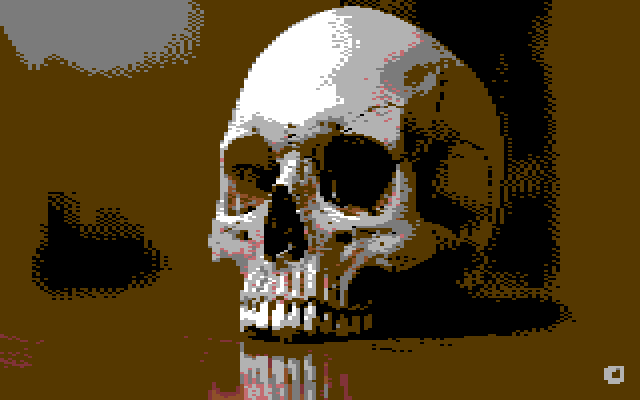
If you've spent any time digging through old Commodore 64 floppy disks or troubleshooting a ZX Spectrum with suspect lower RAM on the bench, you'll know how frustrating it is when you just want to quickly peek inside a raw screen dump or character ROM file on a modern PC.
Most of the time, you either have to fire up a full emulator, hunt down a 20-year-old Windows XP command-line tool that Windows 11 refuses to run, or upload your files to some sketchy third-party conversion site.
So this week in the workshop, I built Tool #14 for the Smiggy Bench & Diagnostics Tools collection: the Bidirectional Retro Graphics Viewer & Converter.
What Does It Do? (Both Ways!)
When I started putting this together, it was originally just going to be a quick viewer to sit alongside the Rust/WebAssembly .D64 Disk Parser & 6502 Disassembler. When you extract a .PRG or .KOA picture from a 1541 disk image—or pull a 901225-01 Character ROM off a C64 board to check for bit-rot—you want to see what's inside straight away.
But once the hardware colour palettes and cell decoders were working, the obvious next question was: "Why not make it work in reverse, too?"
So the tool has two modes you can flip between at the top of the screen:
1. Viewer / Decoder Mode (.KOA, .ART, .SCR, .BIN → PNG)
- Commodore 64 KoalaPaint (
.koa,.kla,.prg— 10,003 bytes): Decodes the$6000load header, the 8,000-byte multicolor bitmap, 1,000-byte Screen Matrix RAM, 1,000-byte 2114 Colour SRAM nybbles, and the$D021background colour byte, rendering them at proper 320×200 aspect ratio. - Commodore 64 Art Studio Hi-Res (
.art— 9,002 bytes): Decodes 320×200 high-resolution 1-bit bitmaps with their 40×25 Screen RAM colour matrix. - Sinclair ZX Spectrum Screen Dumps (
.scr— 6,912 bytes): Unscrambles the famously quirky Ferranti ULA non-linear scanline interleaving ($4000–$57FF) and applies the 32×24 colour attribute grid (INK,PAPER,BRIGHT, and even a button to flip theFLASHphase!). - Raw 8×8 Character & Font ROM Dumps (
.bin,.rom,.chr): Drop any 2 KB, 4 KB, or 8 KB character EPROM dump onto the page and it lays out every 8×8 glyph in a clean 16-column matrix. Brilliant for spotting a stuck address or data bit on a suspect ROM dump.
You can view everything at 1x Native, 2x Crisp, or 4x Zoom with pixel-exact scaling (no blurry browser anti-aliasing!), toggle optional CRT scanlines, switch between Pepto/Colodore PAL, VICE NTSC, ZX Spectrum ULA, or Green/Amber CRT Phosphor palettes, and export the result as a clean modern PNG in one click.
2. Converter / Encoder Mode (PNG, JPG, WebP → Native .KOA, .ART, .SCR)
Switch over to Converter / Encoder Mode and you can drag-and-drop any modern .png, .jpg, or .webp image from your computer (or test it out immediately using the built-in synthwave sunset and cyber-sphere generators).
Instead of just slapping a fake retro filter over an image, this engine actually enforces the real 8-bit hardware rules and packs a genuine binary file you can load on real hardware or in VICE / Fuse:
- True Hardware Cell Constraints: For C64 Koala (
.koa), every 4×8 multicolor cell is strictly limited to 3 local colours plus the shared global$D021background register. For ZX Spectrum (.scr) and Art Studio (.art), every 8×8 character cell is limited to 2 colours (resulting in authentic Spectrum attribute clash!). - Toggleable Floyd-Steinberg Dithering: You can turn error-diffusion dithering on or off and dial the dither bleed strength from
0%to100%in real time. - Pre-Contrast & Brightness Sliders: 8-bit palettes—especially the C64's MOS 6567/6569 VIC-II—have lovely but muted mid-tones. Giving an image a quick
+10to+20contrast nudge before quantizing makes a massive difference. - Instant Binary Download: Click download and you get a real 10,003-byte
.koa(with the$6000load address ready to run), a 9,002-byte.art, or a 6,912-byte.scrfile ready to drop onto a Gotek, SD2IEC, DivMMC, or floppy image.
100% Client-Side — Nothing Ever Leaves Your Browser
Just like the rest of the tools in the Bench Tools Hub and the How-To Workbench Manual, all of the binary parsing, Euclidean colour matching, Floyd-Steinberg dithering, and file packing happens 100% locally inside your browser using JavaScript ArrayBuffer views and the HTML5 Canvas API. There are no server uploads, no queues, and no trackers.
Give It a Spin!
Even if you don't have a .KOA or .SCR file handy right now, I've built four hardware test cards and two synth test generators right into the page so you can play with the palettes, flip ZX Spectrum FLASH attributes, and test the dithering sliders straight away:
Launch the Retro Graphics Viewer & Converter →
Have a play with it, try converting a few photos into C64 Koala or ZX Spectrum .SCR screens, and let me know in the comments below (or in the Guestbook) what other retro formats you'd like to see added next—Amiga IFF/ILBM, Atari ST .NEO/.PI1, or BBC Micro Mode 2 are already on my radar!
Comments (0)
No comments yet. Be the first to comment on Smiggy's article!
Leave a Comment